How to find the radio serial
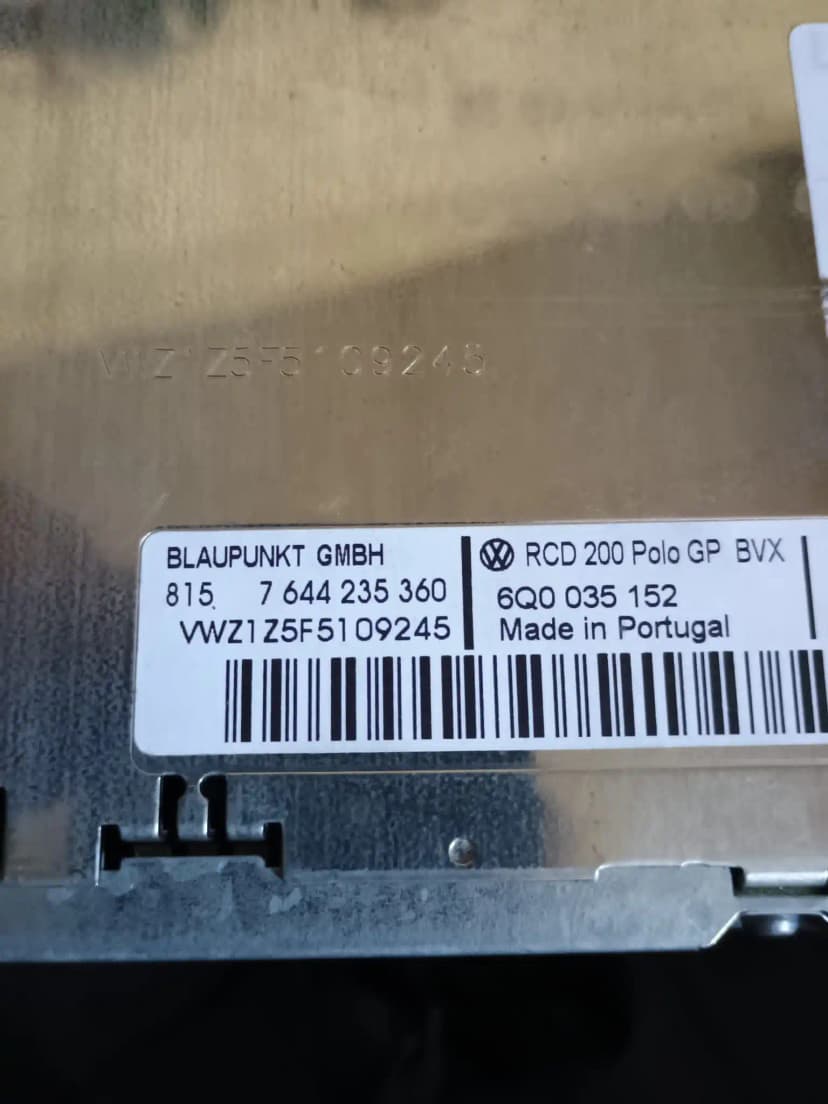
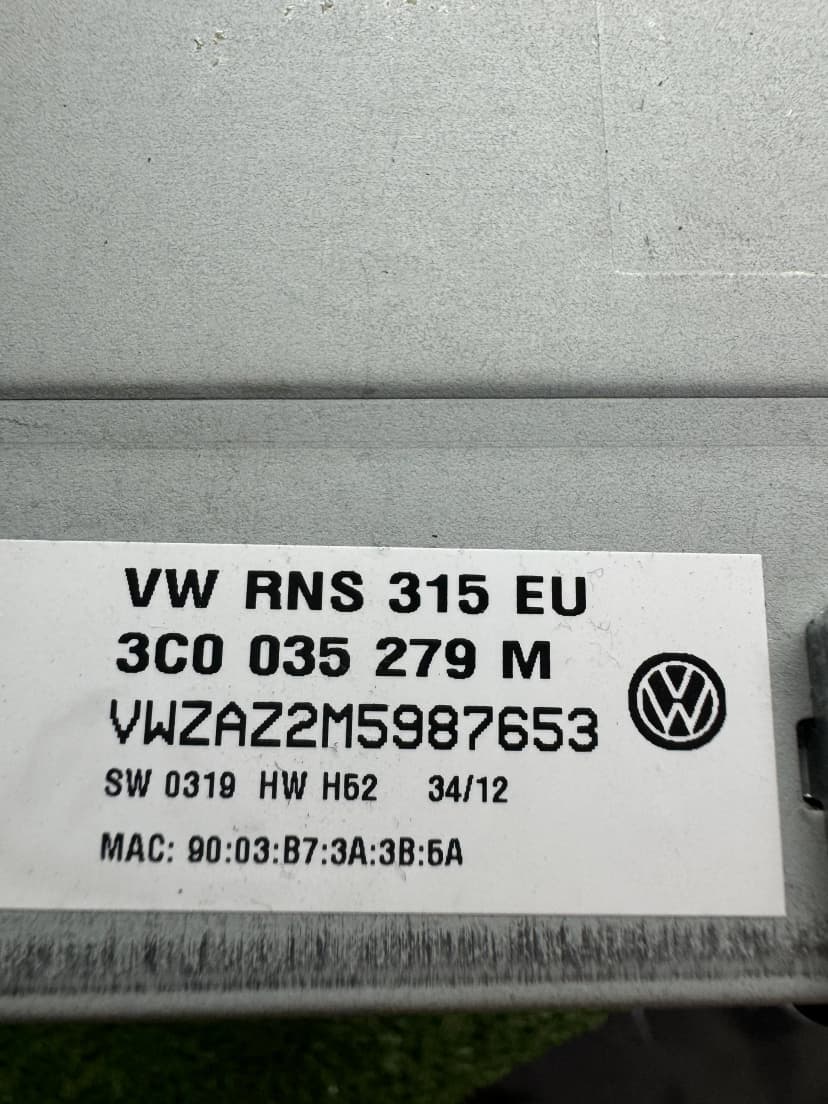
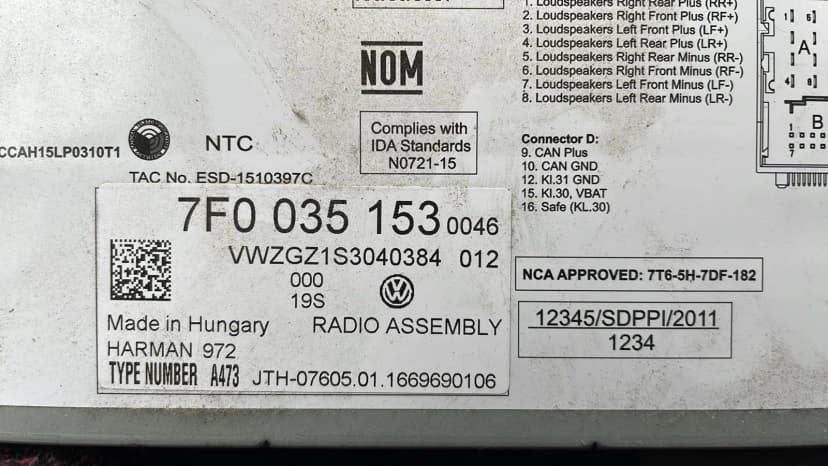
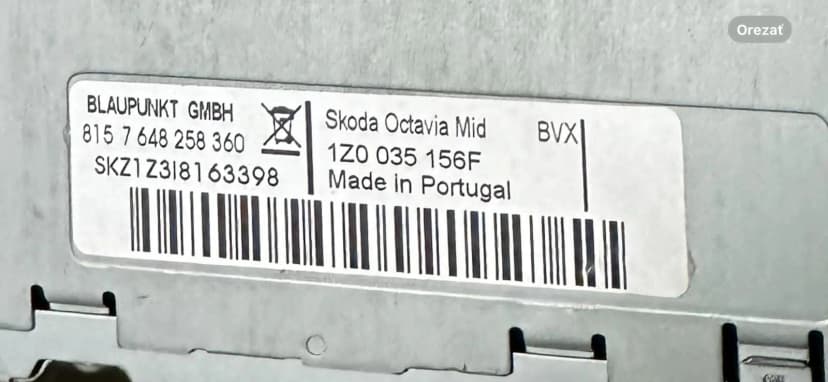
Check the fitted radio label first. Some units can also show the serial with button shortcuts, but the physical label is the safest source for order checks.
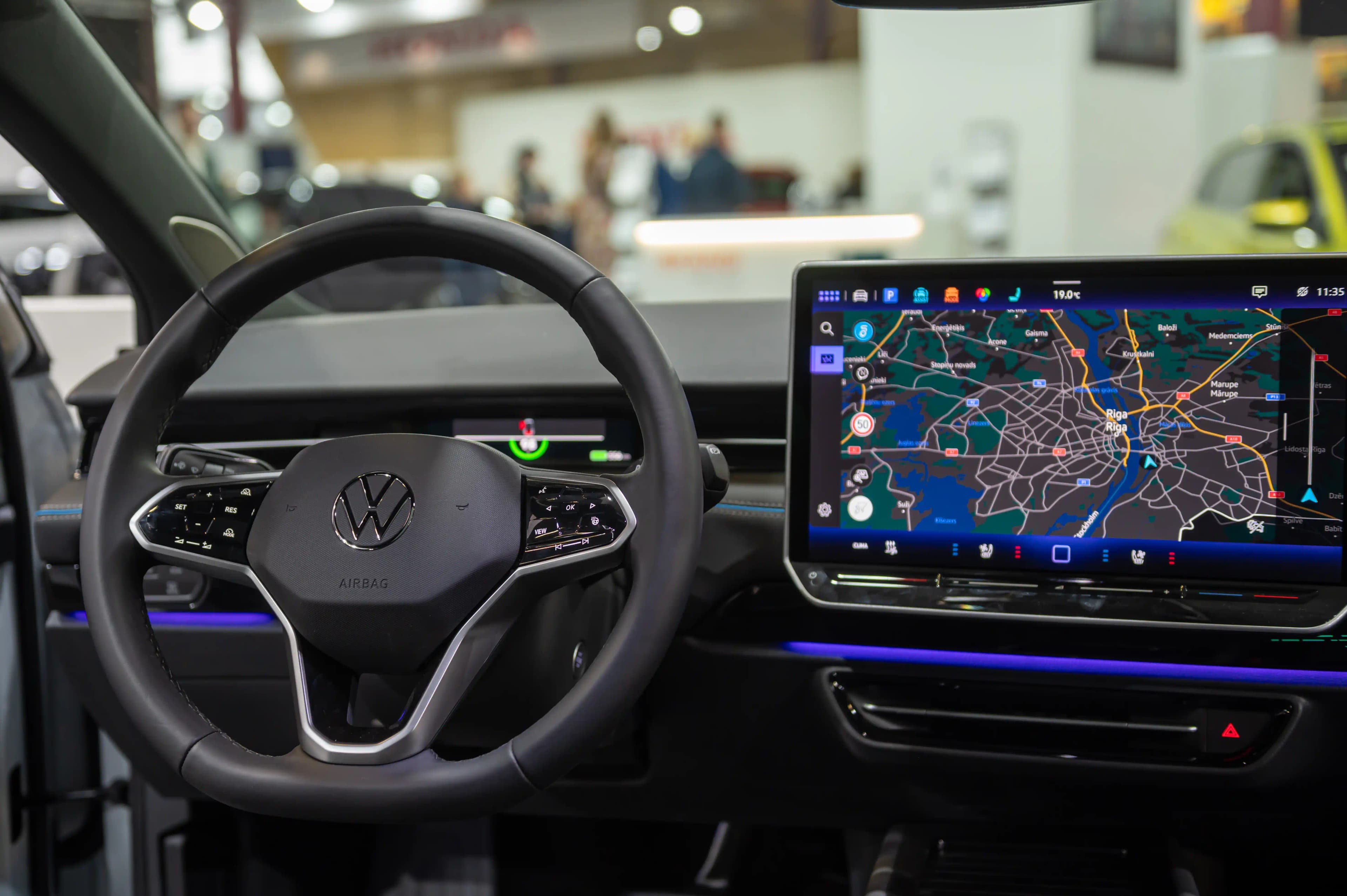
Get your Volkswagen radio code for Golf, Passat, Polo, Tiguan, Touareg, Caddy and more. Request a supported factory radio code online with estimated email delivery.
Battery changed and your VW radio shows "SAFE"? Enter the serial from the fitted unit and request the matching 4-digit unlock code for supported Volkswagen radios. No dealer appointment required for the online request.
Use these steps before ordering, entering a code or handling SAFE mode for Volkswagen.
Check the fitted radio label first. Some units can also show the serial with button shortcuts, but the physical label is the safest source for order checks.
Select the brand, enter the fitted-unit serial, add your email and complete secure checkout. The estimated delivery time is shown before payment.
Most classic VAG radios use preset buttons to set the four digits, then a confirm button. Touchscreen units may use an on-screen prompt.
SAFE mode and support
SAFE or SAFE 2 usually means the radio is locked after power loss or wrong attempts. Waiting rules vary by unit, so avoid guessing.
Choose your model below. Many factory-radio requests can be reviewed from the fitted unit serial.
1997-2026
1996-2026
1999-2026
2007-2026
1999-2026
2002-2026
2003-2026
2017-2026
2017-2026
2004-2026
2003-2026
2010-2026
Many factory Volkswagen radio requests can be reviewed from the fitted unit serial, part number and unit family.
CD Radio
2003-2008
CD Radio MP3
2005-2010
CD Radio MP3
2008-2015
Touchscreen
2008-2015
Navigation
2008-2015
Navigation
2010-2016
Premium Nav
2007-2015
Premium Nav
2010-2016
Find the serial number on your Volkswagen radio.
Enter your serial number and email. Pay securely with Stripe.
Receive the code by email after the serial check. Enter it only when your Volkswagen radio shows a code prompt.
Every Volkswagen factory radio is equipped with an anti-theft code-lock system. When the radio loses power — whether from a battery replacement, electrical repair, or simply disconnecting the battery — the radio enters SAFE mode and requires a 4-digit PIN to unlock. Radio Code Find supports factory radio code requests for these vehicles.
Volkswagen radios display "SAFE" or "1000" when they detect a power interruption. This is an anti-theft feature designed by Volkswagen to make stolen radios useless. Unfortunately, it also triggers during routine maintenance. Here are the most common reasons your VW radio locked:
The most common cause. Even a brief battery disconnect triggers the SAFE lock on all VW radios.
Any work on the car's electrical system — fuse replacement, alternator repair, wiring — can trigger the lock.
Bought a second-hand VW? The previous owner may not have provided the radio code. We can generate it from the serial number.
If your VW battery died and you jump-started the car, the radio will enter SAFE mode once power is restored.
When your Volkswagen radio displays "SAFE" or "2 SAFE", the anti-theft system has been activated. This is normal after any power interruption. Here is exactly how to reset it and enter your code:
Turn on the ignition to the ACC (accessory) position — you do NOT need to start the engine. The radio must be powered on and showing "SAFE" on the display.
Leave the radio powered on for exactly 60 minutes without pressing any buttons. This is the mandatory security cooldown period. After 60 minutes, the display will change from "SAFE" to "1000" (or show four dashes "----").
If the display still shows "SAFE" after 60 minutes, briefly disconnect the battery negative terminal for 30 seconds, then reconnect. Turn ignition on again — the display should now show "1000".
Once the display shows "1000", use the radio preset buttons (1-6) to enter your 4-digit code. Button 1 changes the first digit, button 2 the second, and so on. Each press increments the digit by one.
After entering all 4 digits correctly, press and hold the right arrow button (►) or press buttons 1+6 together for 2 seconds to confirm. The radio will unlock and start working.
You only get 2 attempts before the radio locks again and shows "2 SAFE". If this happens, repeat the 60-minute wait. Do NOT guess codes randomly — each failed attempt triggers another lockout.
Once you have your 4-digit code, entering it on your VW radio is straightforward. The method depends on your radio model:
RCD 200/300/310/510: Use preset buttons 1-4. Press button 1 repeatedly to set the first digit, button 2 for the second, button 3 for the third, and button 4 for the fourth digit.
RNS 310/315/510: Use the rotary knob to scroll through digits, then press to confirm each one. Some models use the touchscreen for input.
Confirm the code: After entering all 4 digits, press and hold the ► (right arrow) button, or hold buttons 1+6 together for 2 seconds.
Older VW radios (pre-2005): Some models require pressing the "OK" or "Enter" button after typing the code using preset buttons.
Pro Tip: If you enter the wrong code, the radio will beep and return to "1000". You have one more attempt before SAFE mode reactivates. Always double-check your code before confirming.
Turn on the radio and simultaneously hold buttons 1 and 6 for 3–5 seconds. The 14-character serial number from the fitted unit label will scroll across the display. Write down the full number carefully — every character matters.
If 1+6 does not work, try holding buttons 2 and 6 simultaneously for 3–5 seconds. This works on some RNS navigation units and newer MIB systems.
Remove the radio from the dashboard using radio extraction keys (4 thin metal prongs). On the top or side of the metal casing, you will find a white sticker with a barcode. The serial number is printed above or below the barcode — copy every character exactly as shown.
Check the original vehicle documentation packet. VW dealers sometimes attach a small card with the radio serial and code to the owner's manual or service book. Look for a credit-card-sized card labeled "Radio Code".
Common issues and how to fix them — no dealer visit needed.
Cause: The radio is in security lockout mode. This happens after 2 consecutive incorrect code entries.
Solution: Leave the radio powered ON (ignition in ACC position) for exactly 60 minutes without touching any buttons. After 60 minutes, the display changes to "1000" and you can try again.
Cause: The code was entered incorrectly (wrong button sequence) or the radio memory has been tampered with.
Solution: Try again carefully — use buttons 1-4 for each digit, then confirm with ► or 1+6. If the factory code truly does not work, the radio EEPROM may have been modified. Contact our support for a DUMP-based code recovery.
Cause: A speaker connector was accidentally unplugged during battery replacement or radio removal.
Solution: Remove the radio again and check that all connectors on the back are firmly plugged in. The main power connector (large) and speaker connector (smaller, often brown or black) must both be seated properly.
Cause: Your radio may be an aftermarket unit, or it was swapped from a different VAG brand vehicle.
Solution: Enter the serial exactly as printed on the fitted unit label. If the format is completely different from a factory VAG radio label, the unit may be aftermarket and may not use the factory code system.
Cause: Too many incorrect code attempts (usually 10+). The radio has entered a permanent lockout state.
Solution: Disconnect the battery for 30 minutes, then reconnect. Turn on the radio and wait the full 60-minute SAFE reset period. If ERROR persists, the radio may need a professional EEPROM reset.
Before disconnecting your VW battery, write down your radio code and keep it in the glovebox. This saves time when the radio inevitably locks after battery work.
Take a photo of the radio label (with serial number) before reinstalling the radio. You may need it again in the future, and removing the radio a second time is avoidable hassle.
If your Golf, Passat, or Polo radio locked after a jump-start, the code will be the same one originally assigned at the factory. It does not change with battery replacements.
VW Navigation systems (RNS 315, RNS 510) use the same 4-digit code system as regular radios. Our service works identically for navigation units.
For VW Transporter T5/T6 commercial vehicles, the radio serial number button combination is the same (1+6). The only difference is that some T5 models have the radio mounted higher in the dashboard.
If you are buying a second-hand Volkswagen, always ask the seller for the radio code before completing the purchase. Without it, you will need to purchase a code after the next battery event.
Why thousands of Volkswagen owners choose our online service over visiting a dealership.
| Feature | Volkswagen Dealer | Radio Code Find |
|---|---|---|
| Price | €30–€80+ | From €15 |
| Delivery Time | 1–5 business days | Estimated delivery: 5-30 min |
| Availability | Business hours only | 24/7, 365 days/year |
| Visit Required | Yes, must drive to dealer | No, 100% online |
| Proof of Ownership | Vehicle registration required | Serial number only |
| Guarantee | Varies by dealer | Full refund if not delivered |
| Multi-language | Local language only | 12 languages supported |
Volkswagen is the world's best-selling car brand, with vehicles on every continent. Whether your Golf was assembled in Wolfsburg, your Polo in Pamplona, or your Tiguan in Puebla — the radio code-lock system is identical, and our service reviews supported requests from the fitted unit serial.
Requests can be reviewed online from fitted-unit evidence, with email support for compatible cases. Some modern infotainment systems may require a compatibility check.
Volkswagen Owner
"My Volkswagen radio got locked after battery change. The code worked on entry! Saved me a trip to the dealer."
Car Enthusiast
"Fast and reliable service. Entered my serial number and received the code by email. Highly recommend!"
Audi Owner
"Excellent service! Got my Audi radio code after the lookup. The process was simple and the price was fair."
Skoda Driver
"Customer support was very helpful. My Skoda radio is working again. Great service!"
Compare our professional service with other options
| Feature | Radio Code Find | VW Dealer | Facebook/WhatsApp |
|---|---|---|---|
Price | €15.00 | €50-100 | €10-30 |
Delivery Time | 5-30 min | 1-3 days | Uncertain |
24/7 Service | |||
Secure Radio Code Lookup | Maybe | ||
Secure Payment (Stripe) | |||
| No Appointment Needed | |||
| Scam Risk | No Risk | No Risk | High Risk |
Start your Volkswagen radio unlock with Radio Code Find.
Volkswagen and related model names are registered trademarks. Radio Code Find is an independent service provider.