How to find the radio serial
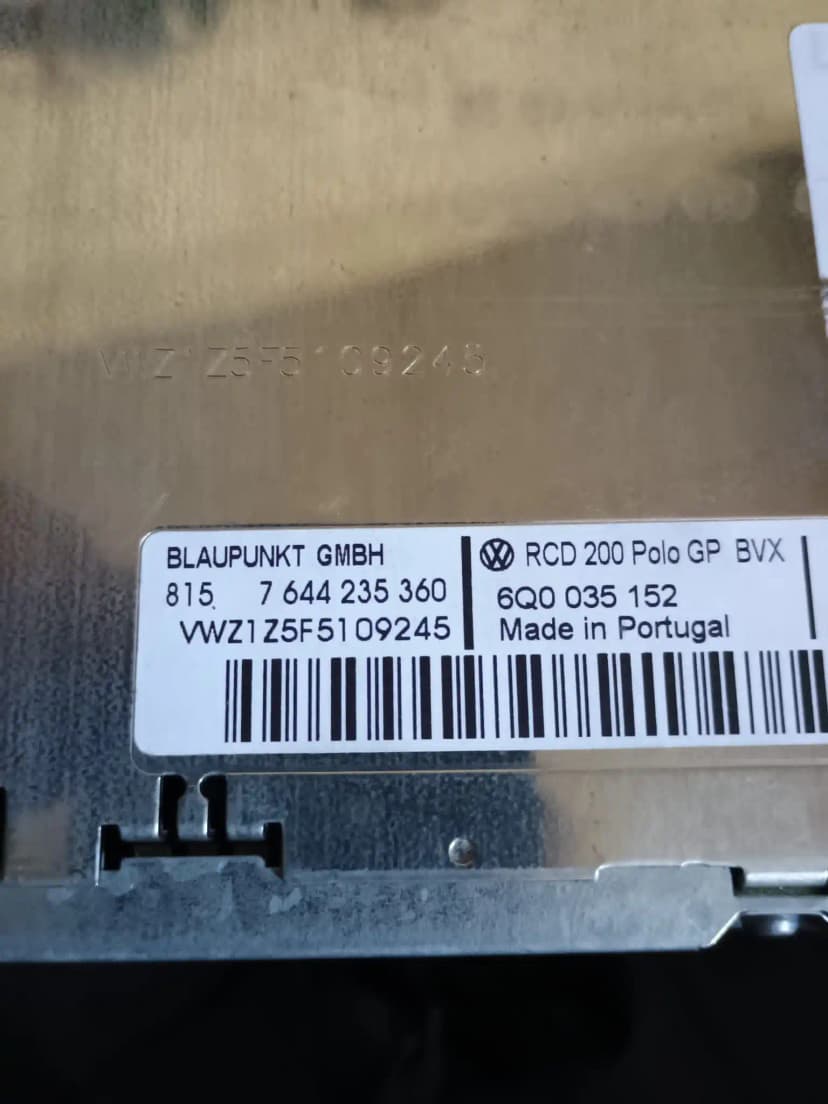
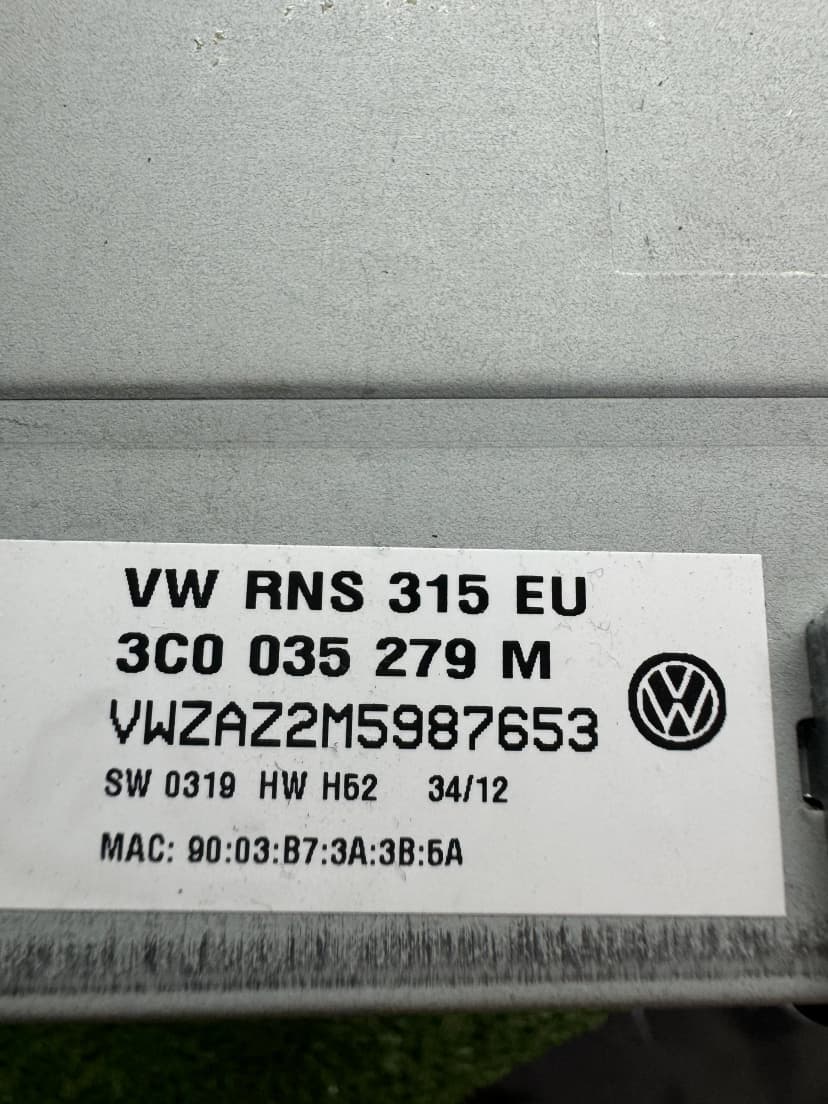
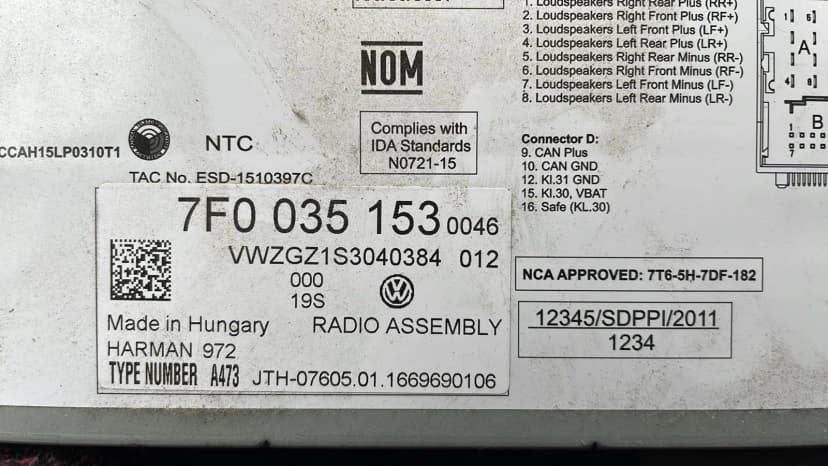
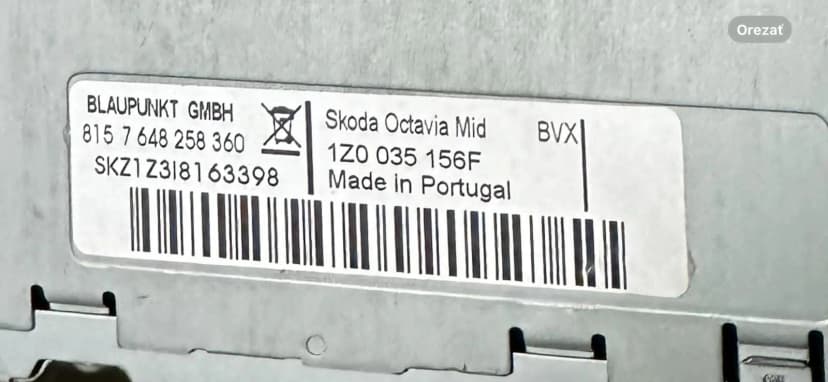
Check the fitted radio label first. Some units can also show the serial with button shortcuts, but the physical label is the safest source for order checks.

Get your Audi radio code for A1, A3, A4, A6, Q5, Q7, TT and more. Request a supported factory radio code online with estimated email delivery.
Your Audi Concert, Symphony or MMI system locked after a battery change? Enter the fitted unit serial and request the matching 4-digit unlock code for supported Audi radios and navigation units.
Use these steps before ordering, entering a code or handling SAFE mode for Audi.
Check the fitted radio label first. Some units can also show the serial with button shortcuts, but the physical label is the safest source for order checks.
Select the brand, enter the fitted-unit serial, add your email and complete secure checkout. The estimated delivery time is shown before payment.
Most classic VAG radios use preset buttons to set the four digits, then a confirm button. Touchscreen units may use an on-screen prompt.
SAFE mode and support
SAFE or SAFE 2 usually means the radio is locked after power loss or wrong attempts. Waiting rules vary by unit, so avoid guessing.
Choose your model below. Many factory-radio requests can be reviewed from the fitted unit serial.
1996-2026
1994-2026
1994-2026
2008-2026
2010-2026
2007-2026
2010-2026
1994-2026
2011-2026
2005-2026
2018-2026
1998-2026
2006-2026
2003-2026
2018-2026
Many factory Audi radio requests can be reviewed from the fitted unit serial, part number and unit family.
Standard Radio
2000-2020
CD Changer
2000-2018
Basic Radio
2005-2018
Navigation Plus
2004-2015
Infotainment
2005-2018
Navigation
2009-2018
Premium Nav
2010-2020
Latest Gen
2015-2026
Find the serial number on your Audi radio.
Enter your serial number and email. Pay securely with Stripe.
Receive the code by email after the serial check. Enter it only when your Audi radio shows a code prompt.
Audi radio-code requests can involve classic Concert, Symphony and Chorus units, RNS-E navigation, or newer MMI/MIB infotainment. Submit the fitted-unit serial, label or screen evidence so supported radio-code cases can be checked and the estimated delivery time can be shown in the order flow.
Audi radios can enter a locked state when they lose power. The display may show SAFE, SAFE OFF or a code prompt. The correct next step depends on the fitted radio or MMI unit, so avoid guessing codes before the serial and screen state are checked.
Battery replacement or battery disconnect is a common trigger for SAFE or code-entry states on supported Audi radio units.
Mechanics often disconnect the battery during servicing. Many Audi owners discover the locked radio after picking up their car from the garage.
Some Audi MMI systems can show a lock or activation-related message after software work or reset. These cases should be checked from the screen message and unit details before code entry.
Bought a used Audi? The previous owner may not have documented the radio code. Send the fitted-unit serial so a supported lookup path can be checked.
Audi radios and infotainment systems can enter SAFE or code-entry states after power loss, service work or unit replacement. Older Concert/Symphony units usually use a classic code prompt, while MMI/MIB systems may need screen-message and part-number review first.
Turn the ignition to position II (ACC) so the radio has full power. If the display reads "SAFE", press and hold the radio power button for about 3 seconds until it changes to "SAFE OFF" — this means the unit is now ready to accept a code.
On Concert / Symphony / Chorus head units: use the preset station buttons 1–4 to enter each digit of your 4-digit code. Button 1 controls the first digit, button 2 the second, and so on. Press each button repeatedly to cycle through 0–9.
Once all four digits are displayed correctly, press and hold the RIGHT arrow button (or the ">" seek button on some models) until the radio beeps and unlocks. On some Chorus units you may need to press and hold both SETUP and the RIGHT arrow simultaneously.
For MMI-equipped Audis (A4 B8+, A5, A6 C6/C7, Q5, Q7): open the MMI menu, navigate to "Radio" or "Media", and look for a code-entry prompt. If no prompt appears, try a hard reset by holding the MMI central knob and the top-left menu button for 10 seconds, then re-enter the code when prompted.
After a successful entry, the radio should restore audio functions. If the display returns to SAFE, stop entering codes and recheck the fitted-unit serial and entry method before another attempt.
Audi radios usually allow only a limited number of incorrect attempts before a timed lockout. Never guess codes; confirm the serial, screen state and entry method first.
The code-entry method depends on which head unit your Audi has. Concert and Symphony radios use physical preset buttons, the Chorus uses a slightly different button layout, and MMI-based systems rely on the rotary controller or touchscreen. Below are model-specific instructions.
Audi Concert (most A3 8P/8V, A4 B6/B7): With "1000" shown on the display, use preset buttons 1–4 to dial each digit individually. Each press increments that digit by one. When the correct code is displayed, press and hold the right-arrow (seek forward) button until the radio unlocks with a confirmation beep.
Audi Symphony (A4 B6/B7, A6 C5): The Symphony uses the same 1–4 preset method as the Concert but has a slightly larger display. Enter digits via buttons 1–4, confirm by holding the right-arrow button. If the display shows "CODE" instead of "SAFE", the procedure is identical.
Audi Chorus (A3 8P, A2): Press and release the SETUP button first — the display will show "CODE" with the first digit blinking. Use the left/right arrow keys to move between digits and the up/down arrows (or rotary knob) to change each digit. Confirm by pressing SETUP again or holding the right-arrow button.
Audi MMI Basic / 3G / 3G+ (A4 B8+, A5, A6 C6/C7, A8 D4, Q5, Q7): The code-entry screen appears automatically or via Settings > Radio Security. Rotate the MMI central knob to select each digit, press the knob to confirm, then move to the next digit. After all four digits are entered, select "OK". If no prompt appears, disconnect the battery for 30 seconds and reconnect — the prompt should show on next boot.
Pro Tip: Some Audi MMI 3G+ and MIB2 systems (2015+) handle the radio code at the firmware level and may not show a traditional code prompt. If your MMI restarts but never asks for a code, a dealer-level ODIS diagnostic session may be needed to clear the lock flag. Contact us if you encounter this — we can advise on the best approach for your specific MMI version.
Turn the ignition on and ensure the radio is powered. Some Concert, Symphony or Chorus units can show serial information through a button combination, but the exact method varies by unit. If the serial is not displayed, use the physical label or MMI information screen instead.
If the button combination does not work (common on Chorus units), the serial is printed on a sticker on the top or side of the radio chassis. You'll need to partially remove the head unit using Audi radio release keys (two U-shaped tools inserted into the slots on either side of the faceplate). Pull the unit out a few inches to read the barcode label — the serial comes from the fitted unit label.
On MMI-equipped models (A4 B8+, A6 C6+, Q5, Q7): press the SETUP or CAR button on the MMI panel, navigate to "Version Information" or "System Info". The radio module serial (often listed as "Radio Part No." or "HW Serial") is displayed here. This is the fastest method on newer Audis and requires no tools.
Check your Audi service booklet or original purchase paperwork; some vehicles include a separate radio card. If documentation is missing or the unit has been replaced, use the fitted radio label, part number or MMI system information instead of relying on vehicle paperwork alone.
Common issues and how to fix them — no dealer visit needed.
Cause: The radio is in initial SAFE lock state and needs to be switched to entry mode before you can type a code. Many owners try pressing preset buttons immediately, but the unit ignores input until the state changes.
Solution: Press and hold the radio power button for 3–5 seconds. The display should change from "SAFE" to "SAFE OFF" (or from "SAFE" to "1000"). This means the radio is now ready to accept your 4-digit code via the preset buttons. If holding the power button does nothing, try turning the ignition fully off, waiting 30 seconds, then turning it back to position II.
Cause: Audi MMI 3G and 3G+ systems handle the radio lock at a deeper firmware level than traditional Concert/Symphony units. After a battery disconnect, some MMI versions re-authenticate silently using stored keys, while others present a non-standard code prompt buried in the settings menu.
Solution: Navigate to SETUP > System Settings > Radio Security (path varies by MMI version). If no security menu exists, try a full MMI reboot: hold the central MMI knob + top-left menu button + top-right BACK button simultaneously for 15 seconds. After reboot, the code prompt usually appears. If it still doesn't, a short ODIS/VCDS diagnostic session can trigger the prompt — many independent VAG specialists can do this for a small fee.
Cause: On Audi vehicles with separate amplifiers (common in A6, A8, Q7 with Bose or Bang & Olufsen systems), the battery disconnect may have also reset the CAN-bus communication between the head unit and the external amplifier module.
Solution: First, try cycling through all audio sources (FM, AM, CD, AUX, Bluetooth) to rule out a source-specific issue. Next, check the volume and balance/fade settings — they sometimes reset to zero or to full-rear. If still silent, turn the ignition off completely, lock the car, wait 5 minutes (this lets all modules fully shut down), then restart. The amplifier should re-sync with the head unit on the next boot cycle.
Cause: The full serial from the fitted unit label must be entered exactly. Common mistakes include confusing the letter "O" with zero "0", mixing up "I" and "1", or missing characters when the serial scrolls across a small display.
Solution: Re-read the serial and photograph the display or label. If the physical sticker differs from the button-combination result, send both versions so support can choose the safer fitted-unit evidence for the lookup.
Cause: This means the entered code was rejected. After two incorrect attempts, Audi radios enter a timed lockout (typically 60 minutes). The ERR/ERROR message confirms the lockout is now active.
Solution: Stop entering codes after an ERROR or ERR message. Keep the unit powered if the manual requires a timed lockout, then contact support with the serial, screen photo and entry steps before another attempt.
Audi Concert and Symphony units can look similar to some VW-era radios, but the button layout and entry method can differ. Use Audi-specific instructions for the fitted unit.
Some Audi MMI 3G or 3G+ cases are tied to the main infotainment unit rather than a standalone radio. Replacement-unit or component-protection messages may need specialist review instead of a normal code entry.
Some specialist diagnostic workflows can read additional unit details, but serial, label and screen evidence are usually the simplest starting point for a supported lookup.
Audi A6 C7 and A7 (4G) owners: your radio code may not clear the "SAFE" state if the MMI unit has a corrupted boot partition. Symptoms include a boot loop or frozen Audi logo. In these cases the code is correct but the system can't reach the entry screen — an MMI firmware reflash is needed before code entry will work.
When replacing the battery on an Audi with MMI, a battery support tool can reduce the chance of infotainment and comfort-module resets during the swap.
For Audi TT (8N, 8J, 8S) owners: the first-generation TT 8N uses a unique "Chorus" variant with half-DIN size — the serial label is on the underside of the unit and is nearly impossible to read without full removal. Use the button combination method (hold preset 1 + preset 6 for 5 seconds) to display it electronically instead.
Why thousands of Audi owners choose our online service over visiting a dealership.
| Feature | Audi Dealer | Radio Code Find |
|---|---|---|
| Price | €40–€100+ | From €40 |
| Delivery Time | 2–7 business days | Estimated delivery: 5-30 min |
| Availability | Business hours only | 24/7, 365 days/year |
| Visit Required | Yes, appointment needed | No, 100% online |
| Documentation | Service book + ID required | Serial number only |
| Guarantee | No refund if code fails | Full refund if not delivered |
Audi has strong demand for radio-code support across Europe, the Middle East and North America. Older Concert, Symphony and Chorus units are often serial-based, while newer MMI/MIB cases should be checked from the screen message, part number and fitted-unit evidence.
Requests can be reviewed online from fitted-unit evidence, with email support for compatible cases. Some modern infotainment systems may require a compatibility check.
Volkswagen Owner
"My Volkswagen radio got locked after battery change. The code worked on entry! Saved me a trip to the dealer."
Car Enthusiast
"Fast and reliable service. Entered my serial number and received the code by email. Highly recommend!"
Audi Owner
"Excellent service! Got my Audi radio code after the lookup. The process was simple and the price was fair."
Skoda Driver
"Customer support was very helpful. My Skoda radio is working again. Great service!"
Compare our professional service with other options
| Feature | Radio Code Find | VW Dealer | Facebook/WhatsApp |
|---|---|---|---|
Price | €15.00 | €50-100 | €10-30 |
Delivery Time | 5-30 min | 1-3 days | Uncertain |
24/7 Service | |||
Secure Radio Code Lookup | Maybe | ||
Secure Payment (Stripe) | |||
| No Appointment Needed | |||
| Scam Risk | No Risk | No Risk | High Risk |
Start your Audi radio unlock with Radio Code Find.
Audi and related model names are registered trademarks. Radio Code Find is an independent service provider.