
How to find the radio serial
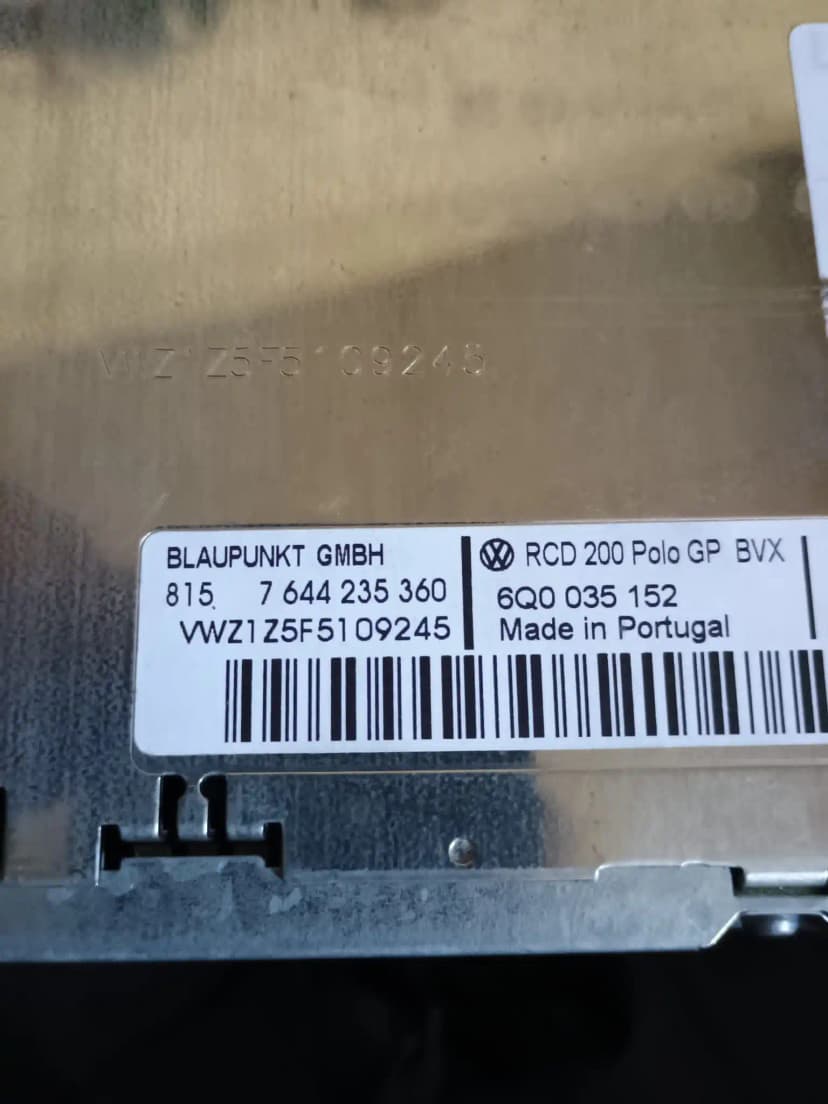
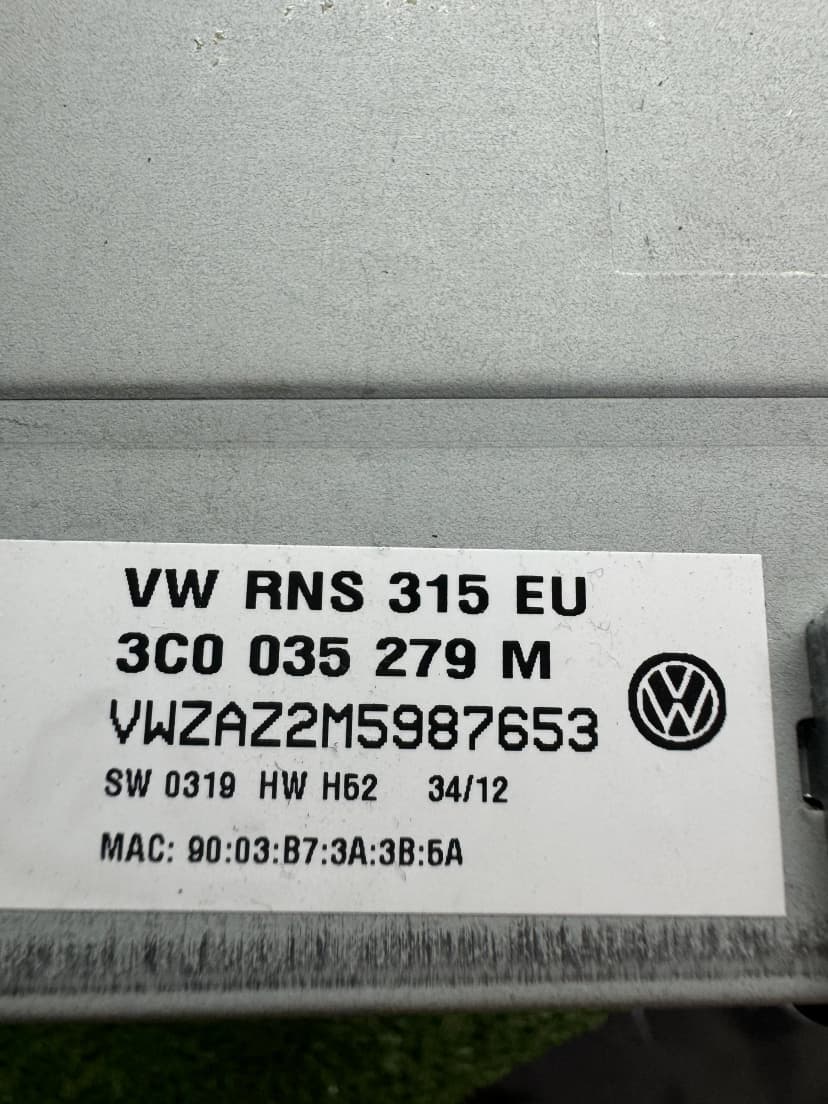
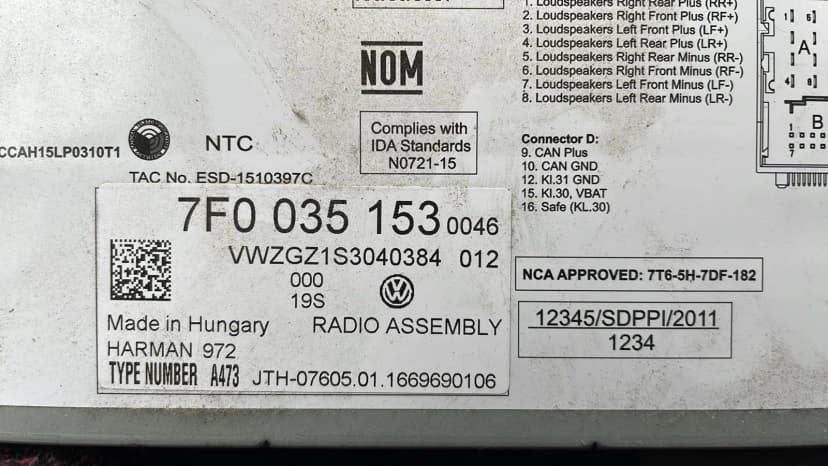
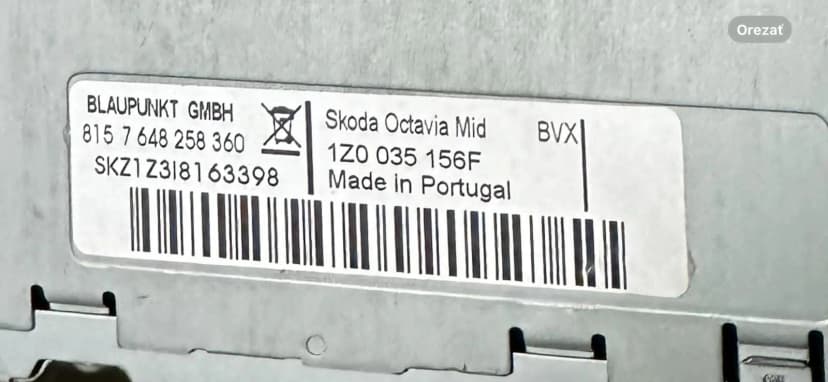
Check the fitted radio label first. Some units can also show the serial with button shortcuts, but the physical label is the safest source for order checks.

Find your radio code or car radio pin code for Volkswagen, Audi, Skoda, SEAT and Cupra. Submit your serial — Radio Code Find reviews supported units and emails your unlock code.
Enter your radio details to get unlock code for Volkswagen, Audi, Škoda or SEAT
Use these steps before ordering, entering a code or handling SAFE mode for your vehicle.
Check the fitted radio label first. Some units can also show the serial with button shortcuts, but the physical label is the safest source for order checks.
Select the brand, enter the fitted-unit serial, add your email and complete secure checkout. The estimated delivery time is shown before payment.
Most classic VAG radios use preset buttons to set the four digits, then a confirm button. Touchscreen units may use an on-screen prompt.
SAFE mode and support
SAFE or SAFE 2 usually means the radio is locked after power loss or wrong attempts. Waiting rules vary by unit, so avoid guessing.
Copy the full serial exactly as printed on the fitted radio or navigation label. Do not change characters to match another format. Contact support if you are unsure.
Eligible factory-radio requests for Volkswagen, Audi, SKODA, SEAT and Cupra vehicles are supported through model year 2026. Availability depends on the exact fitted radio and serial number.
Eligible factory-radio requests for Volkswagen, Audi, SKODA, SEAT and Cupra vehicles are supported through model year 2026. Availability depends on the exact fitted radio and serial number.
Professional, secure, and reliable radio code generation for VW, Audi, Škoda & SEAT with industry-leading support.
Delivery time varies by brand and fitted radio. The current estimate is shown before checkout; manual or complex cases may take longer. The displayed time is an estimate, not a guarantee.
Your serial number is encrypted and never stored. Complete privacy protection with SSL security.
VW, Audi, Škoda, SEAT - RCD, RNS, Concert, Bolero systems supported worldwide. We've got you covered.
Our customers love our service
Secure encrypted transactions
Delivery time varies by brand and fitted radio. The current estimate is shown before checkout; manual or complex cases may take longer. The displayed time is an estimate, not a guarantee.
Volkswagen Golf Owner
"My Volkswagen radio locked after a battery change. I entered the serial, paid, and the code worked on the first try — saved me a dealer visit."
Car Enthusiast
"Extremely fast and reliable service. Entered my radio's serial number and received the code by email. Highly recommend to anyone in the same situation."
Audi A4 Owner
"Excellent service! Got my Audi radio code after the lookup. The verification process was simple and the price was reasonable. 100% satisfied."
Skoda Octavia Driver
"Customer support was very helpful when I had questions about my Skoda radio. Got my code quickly and it worked on the first try!"
Free radio-code promises often rely on incomplete or outdated information. Our service uses a paid support workflow, secure checkout and fitted-unit review so supported requests can be handled responsibly.
Your radio serial is printed on the radio unit label. Some units can also show it with a button combination. Use the fitted unit label when paperwork may not match a replaced radio.
Delivery time varies by brand and fitted radio. The current estimate is shown before checkout; manual or complex cases may take longer. The displayed time is an estimate, not a guarantee.
The online flow is designed for supported Volkswagen, Audi, Skoda, SEAT and Cupra radio-code requests. Payment data is handled by secure providers, and we only ask for the information needed to review the request.
We can review many VAG group radio-code cases, including VW RCD/RNS, Audi Concert/Symphony/Chorus/RNS-E, Skoda Bolero/Swing/Amundsen/Columbus and SEAT Media/Navi systems. Support depends on the fitted unit, serial, label and screen state.
Our service has a support-backed lookup across VW, Audi, Skoda, and SEAT vehicles. If your code doesn't work, double-check the serial number and entry method. Contact our 24/7 support team for a replacement code or full refund.
Yes. We support Volkswagen, Audi, Skoda, SEAT and Cupra radio-code requests where the fitted-unit evidence matches a supported workflow. Some modern MMI/MIB or component-protection cases need compatibility review first.
We require the actual radio serial number for accurate code generation across VW, Audi, Skoda, and SEAT vehicles. VIN-based retrieval is less reliable and may not work for all models. The serial number method ensures support-backed lookup with our radio code generator.
When your VW, Audi, Skoda, SEAT or Cupra radio displays SAFE after battery replacement, start by finding the fitted-unit serial and checking the correct code-entry workflow. Supported cases can then be handled through the radio code generator.
VW, Audi, Skoda, SEAT and Cupra share some VAG-era radio suppliers and serial formats, but the workflow is not identical for every unit. The fitted radio model, serial prefix and screen state decide the correct code path.
Still have questions about our VW, Audi, Skoda, SEAT radio code service?
Contact Our Expert Support TeamEligible factory-radio requests for Volkswagen, Audi, SKODA, SEAT and Cupra vehicles are supported through model year 2026. Availability depends on the exact fitted radio and serial number.
This is an independent service. For supported units, codes are sourced from OEM database records using the fitted radio's serial number; we are not affiliated with Volkswagen Group brands.
Delivery time varies by brand and fitted radio. The current estimate is shown before checkout; manual or complex cases may take longer. The displayed time is an estimate, not a guarantee.
This is the most common situation. Your VW, Audi, Skoda or SEAT radio is displaying SAFE mode after a battery change or electrical work. Here is the complete step-by-step solution:
If the radio shows "SAFE" or "2 SAFE", the anti-theft lockout is active. If it shows "1000" or four dashes "----", you can enter the code immediately (skip to step 4).
Turn the ignition to the ACC position (do not start the engine). Leave the radio on for exactly 60 minutes without pressing any buttons. This is a mandatory security cooldown that cannot be bypassed.
After 60 minutes, the display automatically changes from "SAFE" to "1000" (or "0000" or "----"). If nothing changes, briefly disconnect the battery for 30 seconds, reconnect, and turn on the radio again.
Use the radio preset buttons (1, 2, 3, 4) to set each digit. Each press increments the digit by one. For example, to enter code 4385: press button 1 four times, button 2 three times, button 3 eight times, button 4 five times.
Press and hold the right arrow ► button (or hold 1+6 together for 2 seconds). The radio will beep once and start working. If it beeps multiple times and returns to "1000", the code was wrong — you have one more attempt before another 60-minute lockout.
Important: You only get 2 attempts before the radio locks again. Do not guess — use our service to get the exact factory code from your serial number. It costs far less than a dealer visit.
The serial number is required to generate your radio code. Here are the methods for each brand:
Hold buttons 1+6 simultaneously for 3 seconds. The serial number from the fitted radio label scrolls across the display.
Works on: Golf, Passat, Polo, Tiguan, Touran, Caddy, T5/T6, Jetta, Beetle, Scirocco, Arteon
Hold SETUP + RIGHT arrow (or 1+6 on Concert radios) for 3 seconds. The serial is printed on the fitted radio label.
Works on: A1, A3, A4, A5, A6, Q3, Q5, Q7, TT, R8 — Concert, Symphony, Chorus, MMI
Hold buttons 1+6 or 2+6 simultaneously for 3 seconds. The serial is printed on the fitted radio label.
Works on: Octavia, Fabia, Superb, Kodiaq, Karoq, Rapid, Yeti — Bolero, Swing, Amundsen, Columbus
Hold buttons 1+6 or 2+6 simultaneously for 3 seconds. The serial is printed on the fitted radio label.
Works on: Leon, Ibiza, Ateca, Arona, Tarraco, Alhambra, Cupra — Media System, Navi System
If no serial number appears, the radio may need to be physically removed. Using radio extraction keys (4 thin metal prongs), carefully pull the unit out. The serial number is printed on a white sticker on the top or side of the metal casing. Take a photo before reinstalling.
Something not working as expected? Here are the solutions to the most common problems our customers encounter:
: Incorrect entry method — the buttons must set each digit individually, not be typed like a phone number.
: Use preset buttons 1–4 to set each digit (pressing repeatedly to reach the right number), then confirm with ► or 1+6. Each button controls one digit position only.
: Security lockout after 2 failed attempts.
: Leave the radio on (ignition in ACC) for 60 minutes without pressing anything. After the timeout, the display changes to "1000" and you can try again.
: A speaker connector was accidentally disconnected during battery work or radio removal.
: Remove the radio and check all connectors on the rear are fully seated. The main power harness and the separate speaker connector must both be plugged in firmly.
: The radio may be an aftermarket replacement that does not use the VAG code system.
: Our service only works with original factory radios. If your serial starts with a non-standard prefix, the radio was likely replaced with an aftermarket unit that uses a different (or no) security system.
: More than 10 incorrect code attempts, triggering a permanent lockout.
: Disconnect the battery for 30 minutes, reconnect, and wait the full 60-minute cooldown with the radio on. If "ERROR" persists after this, the radio may need a professional EEPROM reset — contact our support team.
Eligible factory-radio requests for Volkswagen, Audi, SKODA, SEAT and Cupra vehicles are supported through model year 2026. Availability depends on the exact fitted radio and serial number.